UMLP Object Diagrams
Material for the Software Language Engineering and Model-based Software Engineering lecture, Bernhard Rumpe
MontiGem Object Diagrams
This document presents the textual object diagram language as used by MontiGem. We will use the auction system from the lecture as an example. The graphic shows the class diagram (CD) and the corresponding object diagram (OD). MontiGem generates Java classes from the CD and an initial object structure from the OD.
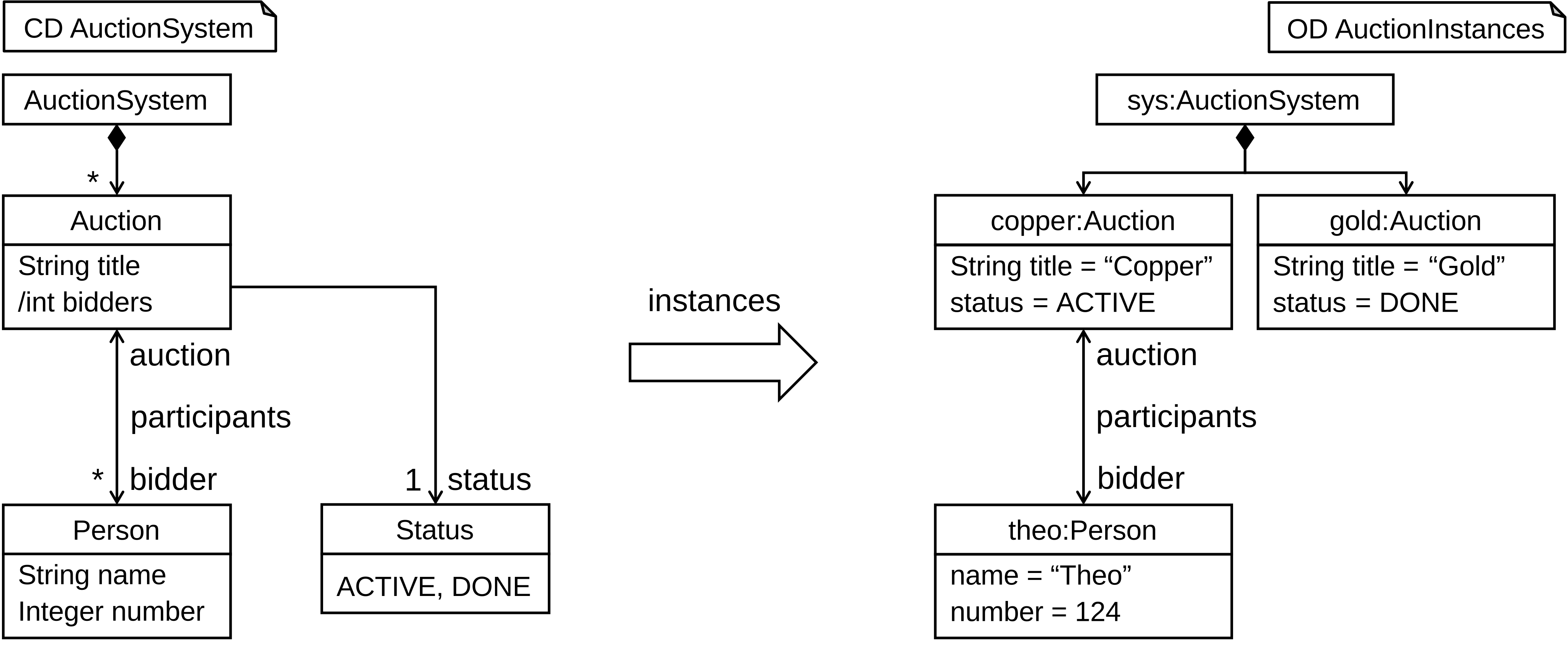
The textual representation of the visualized OD as required by MontiGem:
import AuctionSystem.*;

objectdiagram AuctionSystem {
  sys:AuctionSystem { };

  copper:Auction {
    String title = "Copper";
    Status status = Status.ACTIVE;
  };

  gold:Auction {
    title = "Golder";
    status = Status.DONE;
  };

  composition sys -> (auction) copper;
  composition sys -> (auction) gold;

  theo:Person {
    String name = "Theo";
    int number = "124";
  };

  link copper -> (person) theo;
}
Object Diagrams
ODs are stored in the models folder as .od files. They begin with the
keyword objectdiagram, followed by the name. The OD name must match the name
of the file. The objects and links are defined in the curly brackets.
objectdiagram AuctionSystem {

}
Comments
Textual ODs allow Java-like single-line and multi-line comments before and after
each language element. In this documentation, we use the comment /*...*/ to
indicate the omission of necessary language elements.
/**
 * This is a multi-line comment
 */

/* ... */

objectdiagram AuctionSystem {

  // This is a single-line comment

}
/* This is another comment */
Packages & Imports
ODs can be organized into packages.
The OD must import the corresponding CD AuctionSystem as well as the classes
and associations defined therein AuctionSystem.*. MontiGem uses this to derive
further infrastructure for instantiating the objects. The OD must match the
structure of the CD. For example, no additional attributes may be defined.
package auctionsystem;

// import the AuctionSystem CD
imports AuctionSystem.*;

objectdiagram AuctionSystem {

}
Objects
Objects are defined using the syntax <objectname>:<classname> { };. The object
name must be unique within an OD. The class must be imported using an import
statement.
Anonymous objects :Auction { }; or objects without types copper { }; are not
supported.
imports AuctionSystem.*;

objectdiagram AuctionSystem {
  copper:Auction {

  };
}
Attributes
Attributes of an object are defined using the syntax
<type> <name> = <expression>;. Since the type is already uniquely specified by
the CD, it can also be omitted <name> = <expression>;.
The attributes must be specified by the class, i.e., you may not add attributes that are not defined in the class. Furthermore, you must assign all class attributes an expression that evaluates to the attribute’s value. The type of this expression must be compatible with the specified attribute type.
imports AuctionSystem.*;

objectdiagram AuctionSystem {
  copper:Auction {
    String title = "Copper";
  };

  gold:Auction {
    // the attribute can be omited
    title = "Gold";
  };
}
The expressions can contain almost any Java code, as long as it evaluates to a compatible value:
Literals
-
boolean:true,false -
int: …,-1,0,1, … -
float:42.0f -
double:42.0d -
String:"Lorem Ipsum"
Operations
-
boolean:!,<=,<,==,>,>= -
int,float,double:+,-,*,/ -
String:+
Casting
-
int:(int) Integer.valueOf("42") -
double:(double) 42.0f
Enum Constants
-
SomeEnumClass:SomeEnumClass.someConstant
Enum constants referenced in CDs by association are included as attributes in ODs.
Java Methods
-
Object Methods
-
String:"SOME TEXT".toLowerCase()
-
-
Factory Methods
-
String:String.valueOf(42) -
Integer:Integer.valueOf(10) -
LocalDate:LocalDate.parse("2025-12-11") -
List<String>:List.of("A", "B", "C") -
Set<Integer>:Set.of(1, 2, 3) -
Map<String, Integer>:Map.of("x", 1, "y", 2) -
Optional<String>:Optional.of("value")
-
-
Instantiation
-
String:new StringBuilder().append("SomeString").toString()
-
Note that objects defined in the OD itself are still being finalized during initialization in Java and therefore cannot be accessed. The following example may therefore cause problems:
imports AuctionSystem.*;

objectdiagram AuctionSystem {
  copper1:Auction {
    String title = "Copper";
  };

  copper2:Auction {
    title = copper1.getTitle();
  };
}
Furthermore, the types of the expressions must be imported. To use the
expression LocalDate.parse("2025-12-11"), the type LocalDateTime must be
imported into the CD: import java.time.LocalDateTime;. Primitive data types
and classes from java.lang (String, Math, Integer, Double, Boolean, Character,
etc.) do not need to be imported.
Derived Attributes
Derived attributes are not defined in the OD, but are calculated at runtime.
MontiGem generates an abstract method in the respective Java class from the CDs
for a derived attribute. The Java class also becomes abstract, which means that
no objects can be instantiated from it. These methods have the same return types
as the attribute. Their name has the format get<attribute-name>. For example,
MontiGem generates the following Java class for the derived attribute bidders
of the class Auction:
package auctionsystem;

public abstract class Auction {

   @Override
   public abstract int getBidders();

   /* ... */
}
In order to still be able to create objects of the abstract class at runtime, it
must be extended by a handwritten class. This handwritten class must be created
in the path backend/src/main/java/<project-name>/<class-name>.java. In this
case, the project name is auctionsystem and the class name is Auction.
MontiGem employs the TOP mechanism to allow you to extend the generated
artifacts with handwritten code. The TOP mechanism checks for each class file
that needs to be generated if a file with the same name and package exists in
the handwritten source set. If this is the case, it appends the TOP suffix to
the generated file name. The handwritten class has to provide the same interface
as the generated one. This is typically achieved by extending the TOP class. By
this, the handwritten class may override the behavior of already generated
methods, add additional ones, or even new attributes. Since the generated and
handwritten source code is split into distinct files, regenerating code does not
override the handwritten one.
package auctionsystem;

public class Auction extends AuctionTOP {

   @Override
   public int getBidders() {
      return getParticipants().size();
   }
}
The Auction class extends the AuctionTOP class, which is only generated once
the handwritten class is available. The methods of the handwritten class can
access every functionality of the standard Java library, imported libraries, and
generated code. For derived attributes, the accessor methods of the attributes
are particularly relevant. They have the same format as the methods of the
derived attributes get<attribute-name>.
Links
Links model associations and compositions of CDs at the instance level. Links
model associations and compositions of CDs at the instance level. A link begins
with the keyword link or composition. Keywords can be used regardless of
whether an association or a composition is defined in the CD. This is followed
by the name of the left object sys, the association arrow ->, the type of
the right object as role name (auction), and the name of the right object
copper. The right-hand type is converted to the role name by lowercasing the
first character; all other characters remain unchanged. For example, the type
OFFER would be converted to the role name (oFFER).
imports AuctionSystem.*;

objectdiagram AuctionSystem {
  sys:ActionSystem { };

  copper:Auction { /* ... */ };

  composition sys -> (auction) copper;
}
The links must not create cycles in the object structure. The object structure
therefore forms a tree. Objects that reference other objects must be on the
left-hand side, and the referenced objects on the right-hand side. For example,
the mirrored composition composition copper (auction) <- sys; would not be
valid. The associations support cardinality [0..1] and [*], but not
cardinality [1..*]. Role names that deviate from the type of the right
association are also not supported. Named associations are allowed, but have no
effect on the generated code. Qualifiers are not supported.
Further links on the tooling:
- MontiCore Language Workbench,
- MontiGem,
- MontiCore List of Language,
- CD4Analysis Tool Readme,
- CD4Analysis Tool.
Stay informed about courses and theses!
Join our mailing list to receive the latest updates and announcements directly in your inbox.